Daily Expense
Version: 1.0.3
Route: /expenses/daily
Who can access: Signed-in users.
Screenshot
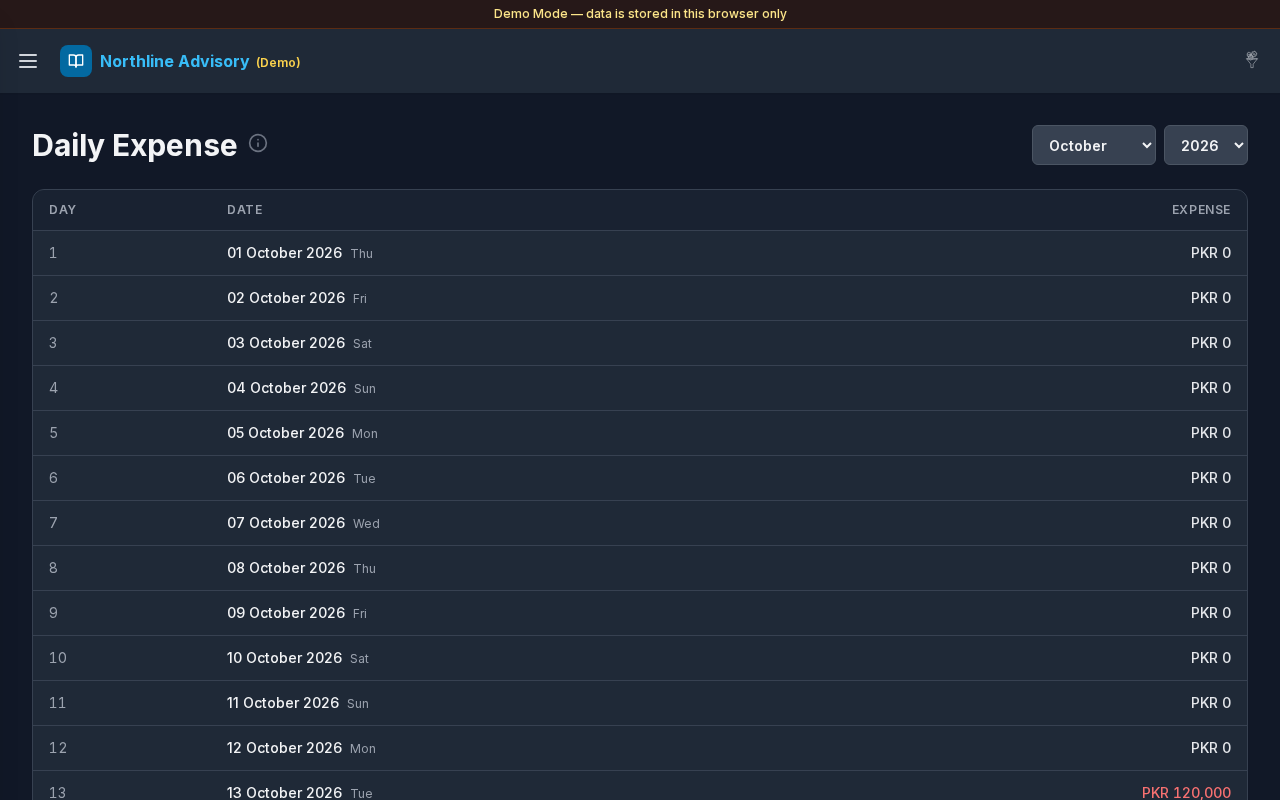
What this page does
Day-wise expense totals for a selected month. Tap or click a day to see which expense accounts contributed. Credit amounts count as spend; debit reverses spend.
Layout at a glance
- Title Daily Expense with info tip
- Month and year selectors
- Desktop table: Day, Date, Expense
- Footer: Total Month Expenses
- Day detail modal with account breakdown and Close
- Mobile: day cards with weekday labels and a Today marker on the current day
Steps
Choose a month
- Open Expenses → Daily Expense.
- Select the month (for example October) and year from the dropdowns.
- The day list refreshes for that month.
Read daily totals
- Scan the Expense column (or amounts on mobile cards).
- Spend appears in red; reverse amounts in green.
- Check Total Month Expenses at the bottom.
Inspect a day
- Select a day row or card.
- A modal titled with the date (for example
29 October 2026 · Wed) lists expense accounts and amounts. - Select an account name to open Transactions for that account (return path: Daily Expense).
- Review Total in the modal, then select Close.
Table columns
| Column | Description |
|---|---|
| Day | Day number in the month |
| Date | Full date with weekday; Today on the current day |
| Expense | Net spend for that day |
Errors & edge cases
- Days with no activity still appear with a zero amount.
- Day modal with no activity: No expense account activity this day.
- Load failures show a calm banner (for example failed to load expenses).
- Info tip: day-wise totals; tap a day for expense accounts; credit = spend, debit reverses.